Finding a 2000 Train Game for My Kids, and Getting It Running on Linux
Finding a 2000 Train Game for My Kids, and Getting It Running on Linux
My boys are 5 and 3. They love trains, along with all the other great things — dinosaurs, Paw Patrol, cars, the usual. I'd been thinking about a game from when I was a kid, something with trains that I vaguely remembered but couldn't quite name. I figured, why not check GOG? No luck. The name was just out of reach.
I threw a search at Brave — something like "old train 2d game with manual forward/backward control and scenarios" — and I don't even remember why I wrote it that way. I think auto-type helped a bit, but it was the best description I had. The first result was a Tip of My Joystick post about an old train game. The number one comment: "Probably not, but 3D Ultra Lionel TrainTown?" The OP said it wasn't theirs. But it was mine. That's the game.
And apparently it was freely available as abandonware. 3D Ultra Lionel TrainTown Deluxe, released by Lionel (the model train company) around 2000. Even though it was only 800×600 and 16-bit colors, you could tell the devs took the time to put some real art into this game. Honestly, it's a beautiful game with great sound. Railroad Tycoon 2 is somewhat similar in scope, but can't match the detail TrainTown packed into its close-up sprites. You can see the difference:
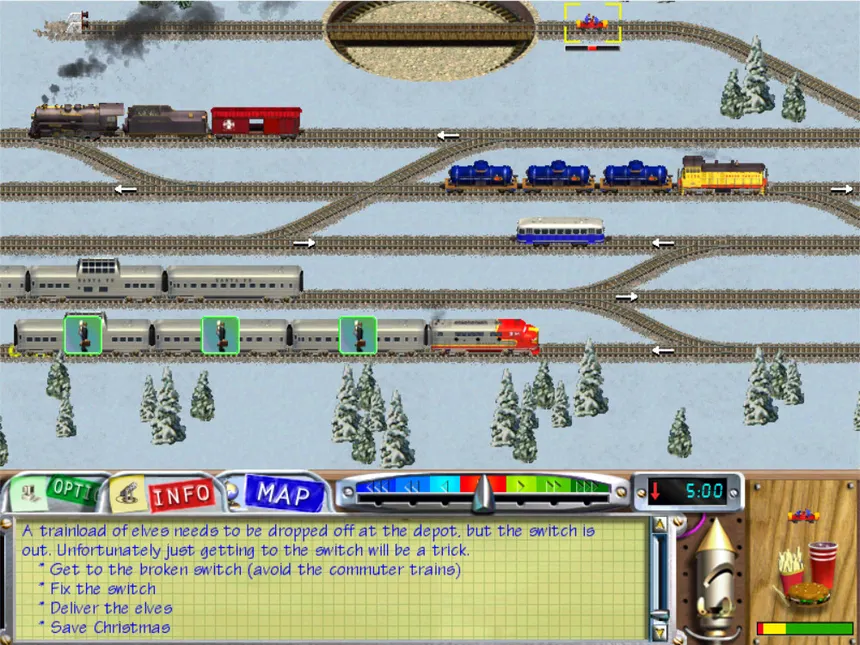
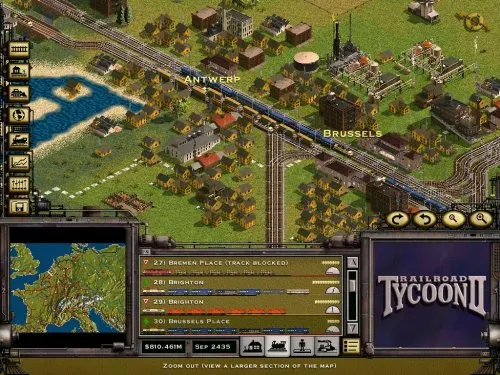
The game was narrated, logical, and had these scenarios that stuck with me. I didn't play the free-form or layout-building modes — I played the shipped scenarios. I remember one where you're managing multiple trains and cargo around the Statue of Liberty in a tight time box, another where you're controlling crossings without any backup so one wrong move means a collision, and even something with Santa Claus, I think. There was a lot of charm in it.
I brought my boys upstairs, and they both ended up sitting in my office chair — that Herman Miller Embody I bought from Smart Furniture back when I worked there. I love that chair. It had the three features I wanted: adjustable armrests, casters, and reclining support. I remember the day I went to every store in the Chattanooga region trying to find an office chair with those three features and couldn't find a single one. Ended up getting the overpriced chair from my employer. My only dislike about it is the lack of a headrest. They took turns with the mouse since it was primarily mouse-driven, the other watched, and they were both amused. They had enough energy for each boy to get three turns. The tutorial was clear enough for them to understand what was happening and what the goal was — even though I needed to help their motor skills out. They're 5 and 3, so they haven't done a lot of basic computing yet. It's almost like they were born yesterday.
I grabbed the Full-Rip from myabandonware.com and, surprisingly, it just ran. Basic Wine configuration and it launched. It ran better than most games I've tried getting on Wine — Celtic Kings is still giving me frustrations. This was a pleasant shock.
Then I saw the problem. The game runs at 800×600 on a 1920×1080 monitor. That's a small square in the middle of the screen. My boys struggled. Their mice kept moving off the game window onto the rest of the desktop. They'd click slightly off-target even with my hand trying to steady theirs. I could see they were engaged, but the friction was real. If I wanted to give them freedom to play on their own, the game needed two things: scaled up so they could actually see what they were doing, and mouse trapped so it couldn't escape — more like old games did, fullscreen with no easy exit. I brought in my local LLM coding agent (Qwen3-27B on ROCm) to figure out the technical side. I'd just spent the past two weeks optimizing that setup and was getting some good results — stew675's llama.cpp RDNA boosts gave me 2x prompt processing and decode performance over what I was getting before. I hope to write more about that later. Having it do the trial-and-error was genuinely faster than me doing it myself — it could run commands, check results, read screenshots, and iterate without me babysitting each step.
It went through several approaches before finding one that worked. The agent couldn't find any resolution config in plaintext anywhere, so I suggested trying a binary patch — I know some games, like Europa Universalis 3, have resolution settings buried in binaries that you have to hex edit. Frustrating, but sometimes it works. So it tried patching the TrainDlx.exe binary, replacing occurrences of 800 and 600 with larger values. This made the window bigger but corrupted the rendering — the game's internal surface coordinates didn't match its display coordinates, so sprites rendered in wrong positions. Eventually the game crashed. Not surprising — games embed resolution in multiple places (display mode, rendering surface, UI layout). Patching one doesn't patch all.
Then it tried launching the game and using xdotool to resize the window to 1280×960. Wine stretched the 800×600 DirectDraw surface to fill the larger window, leaving black borders and garbled graphics. Same underlying problem — the rendering surface stayed at 800×600 no matter what.
Wine has a /desktop= flag that creates a virtual framebuffer, and the agent tried using that to contain the game in a fixed-size desktop window, then scaling the desktop. In theory, perfect. In practice, scaling the desktop triggered the game's display mode check, which either crashed it or didn't expand past the 800×600 square. Along the way, we discovered that the Wine prefix's registry had accumulated corrupt DirectDraw/Direct3D settings from earlier dgVoodoo2 testing — the EmulateViewport key in the X11 Driver registry was set to 800x600, causing the game to fail its display check even when launched normally. Apparently LLMs are just like me — Wine setups are so confusing, it's easier to make a new one than try to fix an existing one. So that's what it did.
The winning approach was embarrassingly simple — and it was discovered for two reasons. First, the LLM dismissed xrandr as unnecessary overhead. Second, it didn't bother to actually check my desktop state before trying things and assumed I had something like 1280×980 or whatever that resolution is. Turns out the simple thing works: use xrandr to switch the monitor to 800×600, launch the game (it goes fullscreen at the correct resolution), let it run clean at native resolution, then restore 1920×1080 when the game exits.
After getting fullscreen working, I noticed the mouse kept going off the game window. If I clicked on either side, I was greeted with five seconds of blackness as all the screens freaked out trying to minimize a fullscreen application on a different resolution. So I asked the LLM to trap the mouse in the window too.
At first, it wanted to make it like an FPS — mouse keeps getting recentered in the window after it leaves. That's silly. Silly LLM. I told it we need to clamp at the edge, and make sure the mouse can't easily leave. We ended up with a loop that polls every 20ms and clamps the cursor five pixels inside the window. That padding should keep the kids' cursor in the window easily without it accidentally going over.
Here's what the final script looks like:
#!/bin/bash
# Switch monitor, run game, restore
trap 'xrandr --output DP-1-2 --mode 1920x1080 --pos 1920x0 --output DP-1-0 --mode 1920x1080 --pos 3840x0 --output DP-1-4 --mode 1920x1080 --pos 0x0; kill $CAPTURE_PID 2>/dev/null; exit' EXIT INT TERM

# Switch center monitor to 800x600, keep others in place
xrandr --output DP-1-2 --mode 800x600 --pos 1920x0 \
       --output DP-1-0 --mode 1920x1080 --pos 3840x0 \
       --output DP-1-4 --mode 1920x1080 --pos 0x0

# Mouse capture: poll every 20ms, clamp cursor to window bounds
capture_mouse() {
    local GAME_WIN=""
    while [ -z "$GAME_WIN" ]; do
        GAME_WIN=$(xdotool search --name "3D Ultra Lionel" 2>/dev/null | head -1)
        sleep 0.1
    done

    # 5px safety margin inside the 800x600 window at pos 1920x0
    local LEFT=1925 TOP=5 RIGHT=2715 BOTTOM=595

    while xdotool getwindowname "$GAME_WIN" &>/dev/null; do
        local POS MX MY
        POS=$(xdotool getmouselocation --shell 2>/dev/null)
        MX=$(echo "$POS" | grep "^X=" | cut -d= -f2)
        MY=$(echo "$POS" | grep "^Y=" | cut -d= -f2)
        [ "$MX" -le "$LEFT" ] && MX=$((LEFT + 2))
        [ "$MX" -ge "$RIGHT" ] && MX=$((RIGHT - 2))
        [ "$MY" -le "$TOP" ] && MY=$((TOP + 2))
        [ "$MY" -ge "$BOTTOM" ] && MY=$((BOTTOM - 2))
        xdotool mousemove "$MX" "$MY"
        sleep 0.02
    done
}

capture_mouse &
CAPTURE_PID=$!
WINEPREFIX="$FRESH_PREFIX" WINEDEBUG=-all wine traindlx.exe
wait $CAPTURE_PID 2>/dev/null
There's a ~4-second flicker when the monitor switches resolution, and the kids still can't play completely unattended. But it works well enough that the fact that it's 25 years old doesn't matter.
Having an LLM agent handle the technical investigation was useful. It ran experiments I didn't want to do — binary patching, registry digging, xdotool coordinate math. It iterated fast, read screenshots to verify rendering, and documented as it went.
Worth noting: I've spent a lot of time building sophisticated system instructions and custom CLI tools for this agent. The payoff is that I can be as lazy as possible on the prompt side. I don't want to spend time telling the LLM where to find X, how I want to do Y, or why A is better than B. That's what the instructions are for. I see IMing with a robot as a waste of time — the less I type into the chatbox, the better. After I press enter, that energy is gone and can't be repeated. Here's what this session actually looked like from my side: "is there a way to maximize it and/or make it bigger," "I guess we could try to edit the binary, right?," "definitely not good," "Works perfectly. One more thing: cursor should be stuck in the game." The agent figures out the rest from the instructions, from the documentation it's forced to write, from the patterns it has to follow.
Sometimes LLM agents are good at trying new things I wouldn't have thought of. But even in topics I'm not an expert in, one of the more powerful interactions is just asking the right question.

The main limitation is that an experienced human can always drive an LLM to an efficient solution a lot faster by just asking the right questions. The LLM tried things that didn't work because it didn't have the context. I had to guide it toward binary patching when it couldn't find plaintext config. I told it the FPS-style mouse centering was silly — we need clamping, not recentering. I corrected its wrong assumption about my monitor resolution and made it actually read the screenshots before declaring success. The agent is a good pair programmer, but it still needs a senior developer telling it what to try.
Maybe I'll do a follow-up post turning this basic bash script into a C# AOT-published binary. It'd be cool to have .aot.cs be a thing where a .cs file turns into an exe with a single call, but that's beside the point.
Anyway, I hope this setup works for the kids next time we play. The weekend just started — Friday evening with all this happening — and we finally have one to two weeks with no sports for a bit. Maybe we'll find some time here and there for them to learn it more, if they want.
A game from when I was a kid, running perfectly well for my kids. In a world where nothing is made to last anymore — from appliances, to shows and movies (Amazon removing content from purchase history), to even marriages (divorce rates are at tragic levels) — it's amazing to see something like this work. It confirms my overall feelings: if people want things to last, they can't rely on BigTech or the cloud. None of this would've been doable by relying on GamePass or anything like that. Seems like an apt thing to think about with PS6 getting rid of discs.